SOP: Sendblue iMessage Channel Enforcement in GoHighLevel
Last updated: July 29, 2026
Purpose
This SOP explains how to configure GoHighLevel (GHL) so that Sendblue becomes the forced default reply channel for any contact previously messaged through Sendblue. By applying custom JavaScript and CSS at the agency level, the iMessage tag automatically routes all replies to the iMessage/Sendblue channel — eliminating the risk of team members accidentally responding via SMS.
Video Guide
What This Accomplishes
Makes Sendblue the primary response channel for contacts tagged with iMessage
Prevents users from accidentally replying via the wrong message channel
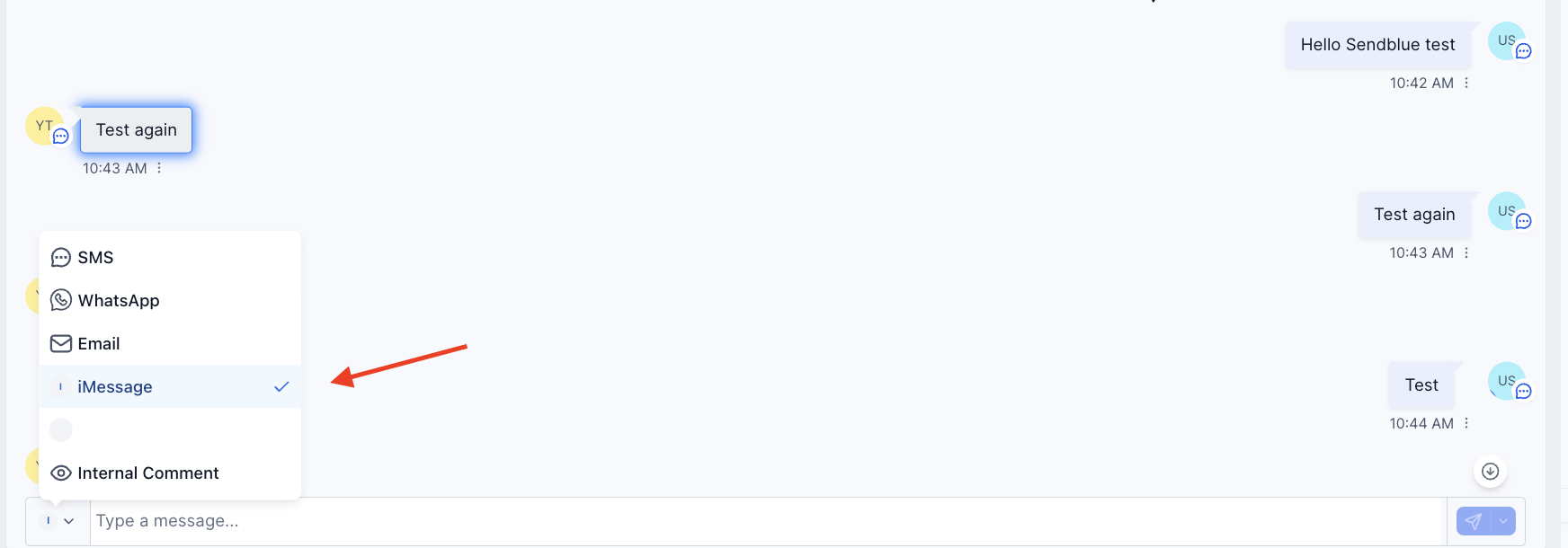
Highlights iMessage conversations in blue for instant visual identification
Forces GHL to open directly into the iMessage channel when the tag is present
Works automatically for every contact with the tag — no manual selection required
Requirements
⚠ GHL Agency-Level Access is required. This cannot be done from a sub-account.
Agency admin credentials for the GHL account
Sendblue integration is active and contacts have been messaged via Sendblue
Custom JS and CSS code ready to paste (at the bottom of this SOP)
How the iMessage Tag Works
The iMessage tag is the trigger for this automation. When GHL detects this tag on a contact:
The conversation is highlighted in blue, indicating an iMessage/Sendblue thread
The reply channel is automatically forced to iMessage — SMS cannot be accidentally selected
This behavior is enforced by the custom JS/CSS installed at the agency level
Without this code, GHL may not default to the correct channel, causing team members to unknowingly reply via SMS even when Sendblue was used previously.
Setup Instructions
Step 1: Log in with Agency-Level Access
Sign in to GoHighLevel using agency admin credentials. Sub-account access is not sufficient.
Step 2: Navigate to Agency Settings
Click Settings in the left-hand navigation menu from the agency dashboard.
Step 3: Open Company Settings
Within Settings, select Company to open the agency-level configuration page.
Step 4: Go to the White Label Tab
Locate and click the White Label tab. Scroll down until you see Custom JS and Custom CSS fields.
Step 5: Input the Custom JS Code
Paste the Sendblue-provided JavaScript code into the Custom JS field.
Step 6: Input the Custom CSS Code
Paste the Sendblue-provided CSS code into the Custom CSS field.
Step 7: Save
Click Save. Changes apply immediately across the entire agency.
Step 8: Test
Open a contact with the iMessage tag. Confirm the conversation is highlighted in blue and the reply channel defaults to iMessage.
Troubleshooting
Channel is not being forced after tag is applied:
Confirm the JS and CSS were saved correctly in agency settings
Clear browser cache and reload GHL
Verify the tag is named exactly "iMessage" (case and spacing matter)
Ensure the change was saved at the agency level, not sub-account
Blue highlight is not showing:
Confirm the CSS code is in the Custom CSS field (not the JS field)
Verify the contact has the iMessage tag applied
Important Notes
This is an agency-wide change — it affects all sub-accounts and users. Coordinate with your team before implementing.
Do not modify the custom JS/CSS without guidance from Sendblue support.
The tag must be named exactly iMessage for the code to trigger.
Support & Escalation
If the configuration doesn't work after following these steps, reach out to your Sendblue CSM with a Loom or screen recording showing the issue. Include the GHL sub-account name and a description of the current tag behavior.
Custom JS
<script>
  window.addEventListener("message", (event) => {
    if (event.data === "closeIframe") {
      const chatBubble = document.getElementById("chatBubble");
      if (chatBubble) chatBubble.style.display = "none";
    }
  });

  // ---------- phone number ----------
  function findPhoneNumber() {
    const phoneInput = document.querySelector(
      '.hr-input-container.hr-input-phone input.hr-input__input-el'
    );
    if (!phoneInput) return;
    let n = (phoneInput.value || '').trim().replace(/[+()\-\s]/g, '');
    if (!n) return;
    if (/^\d{10}$/.test(n)) n = '1' + n;
    return `%2B${n}`;
  }

  // ---------- channel detection / switching ----------
  function getCurrentChannel() {
    const trigger = document.querySelector('#conv-provider-select-trigger');
    if (!trigger || !trigger.firstElementChild) return null;
    const first = trigger.firstElementChild;
    if (first.tagName === 'DIV' && first.textContent.trim() === 'I') return 'imessage';
    return 'other';
  }

  function openProviderDropdownAndClickIMessage() {
    const trigger = document.querySelector('#conv-provider-select-trigger');
    if (!trigger) return;
    trigger.click();
    let attempts = 0;
    const iv = setInterval(() => {
      attempts++;
      const options = document.querySelectorAll('[id^="conv-provider-option-"]');
      const imessageOption = Array.from(options).find((o) =>
        o.querySelector('.text-sm.font-medium')?.textContent.trim().toLowerCase() === 'imessage'
      );
      if (imessageOption) {
        clearInterval(iv);
        imessageOption.click();
      } else if (attempts >= 20) {
        clearInterval(iv);
        trigger.click();
      }
    }, 30);
  }

  function autoToggleIMessageFor(key) {
    const trigger = document.querySelector('#conv-provider-select-trigger');
    if (!trigger) return;
    if (getCurrentChannel() === 'imessage') {
      trigger.setAttribute('data-auto-toggled-for', key);
      return;
    }
    if (trigger.getAttribute('data-auto-toggled-for') === key) return;
    trigger.setAttribute('data-auto-toggled-for', key);
    openProviderDropdownAndClickIMessage();
  }

  function toggleImessage() {
    autoToggleIMessageFor(location.pathname);
  }

  function toggleImessageContactDetail() {
    autoToggleIMessageFor('contact-detail');
  }

  // ---------- blue halo on messages ----------
  function showBlueIconInConvo() {
    const messages = Array.from(
      document.querySelectorAll('div.message-item:not([has-sendblue-imessage-info])')
    );
    messages.forEach((row) => {
      if (row.hasAttribute('has-sendblue-imessage-info')) return;

      const avatar = row.querySelector('.hr-avatar');
      const isOutbound =
        row.getAttribute('data-testid') === 'ASSERT_SENT_MSG' ||
        !!row.querySelector('.chat-bubble-outbound');

      if (avatar) {
        const imessageInfo = document.createElement('div');
        imessageInfo.classList.add(isOutbound ? 'imessage-bubble-outbound' : 'imessage-bubble');
        imessageInfo.title = 'This message was sent via iMessage.';
        const bubbleImg = document.createElement('img');
        bubbleImg.src = 'https://dashboard.tryraz.com/assets/icons/iMessage.svg';
        imessageInfo.appendChild(bubbleImg);
        avatar.appendChild(imessageInfo);
        row.setAttribute('has-sendblue-imessage-info', 'true');
      }

      if (!isOutbound) {
        const bubble = row.querySelector('.chat-bubble-inbound');
        if (bubble) bubble.classList.add('imessage-chat-window');
      }
    });
  }

  // ---------- gating: contact has the "imessage" tag ----------
  function hasIMessageTag() {
    return !!document.querySelector('#tag-imessage');
  }

  function handleIMessageValidation() {
    if (!hasIMessageTag()) return;
    toggleImessage();
    showBlueIconInConvo();
  }

  function handleIMessageContactPageValidation() {
    if (!hasIMessageTag()) return;
    toggleImessageContactDetail();
    showBlueIconInConvo();
  }

  // ---------- main entry ----------
  function addCallButton() {
    if (document.querySelector('#conv-provider-select-trigger')) {
      handleIMessageValidation();
    }
    if (document.querySelector('#contact-details')) {
      handleIMessageContactPageValidation();
    }
  }

  let timeout;
  const observer = new MutationObserver(() => {
    clearTimeout(timeout);
    timeout = setTimeout(addCallButton, 100);
  });
  observer.observe(document.body, { childList: true, subtree: true });
  document.addEventListener('DOMContentLoaded', addCallButton);
</script>
Custom CSS
<style>
  /* Chat bubble styling */
  .chat-bubble {
    display: none; /* Hidden by default */
    position: fixed;
    bottom: 20px;
    right: 20px;
    width: 600px;
    height: 600px;
    background-color: #fefefe;
    border: 1px solid #888;
    box-shadow: 0 4px 8px rgba(0, 0, 0, 0.2);
    resize: none;
    overflow: hidden;
    z-index: 1000;
  }

  .chat-header {
    background-color: #01dda5;
    color: #fff;
    padding: 10px;
    cursor: move;
    text-align: right;
    font-weight: bold;
  }

  .iframe-container {
    width: 100%;
    height: calc(100% - 40px);
    position: relative;
  }

  .iframe-container iframe {
    width: 100%;
    height: 100%;
    border: none;
  }

  /* Resize handle */
  .resize-handle {
    position: absolute;
    bottom: 0;
    right: 0;
    width: 20px;
    height: 20px;
    background-color: #01dda5;
    cursor: se-resize;
    z-index: 10;
    border-top: 2px solid #888;
    border-left: 2px solid #888;
  }

  /* Overlay to prevent iframe interference during resizing */
  .resize-overlay {
    position: absolute;
    top: 0;
    left: 0;
    width: 100%;
    height: 100%;
    background: transparent;
    display: none;
    z-index: 5;
  }

  /* Button styling */
  #openChatBubble {
    position: fixed;
    bottom: 20px;
    right: 20px;
    width: 50px;
    height: 50px;
    background-color: #01dda5;
    color: #fff;
    border: none;
    cursor: pointer;
    border-radius: 50%;
    display: flex;
    align-items: center;
    justify-content: center;
    box-shadow: 0 4px 8px rgba(0, 0, 0, 0.2);
  }

  /* SVG icon styling */
  #openChatBubble svg {
    width: 24px;
    height: 24px;
    fill: #ffffff;
  }

  /* Bubble next to inbound*/
  .imessage-bubble {
    z-index: 1;
    background: white;
    border-radius: 50%;
    height: 18px;
    width: 18px;
    display: flex;
    justify-content: center;
    align-items: center;
    position: absolute;
    right: -10px;
    top: 22px;
  }

  .imessage-bubble-outbound {
    z-index: 1;
    background: white;
    border-radius: 50%;
    height: 18px;
    width: 18px;
    display: flex;
    justify-content: center;
    align-items: center;
    position: absolute;
    right: 25px;
    top: 22px;
  }

  .imessage-bubble,
  .imessage-bubble-oubound img {
    max-width: 100%;
    max-height: 100%;
  }

  .imessage-chat-window {
    border: 1px solid #2284ff !important;
    box-shadow: 0 0 10px 2px #2284ff !important;
  }
</style>