What does the ‘iMessage’ tag do in GHL?
Last updated: December 1, 2025
Overview
The iMessage tag in GoHighLevel (GHL) tells the system that a contact should automatically be routed through the iMessage channel instead of regular SMS whenever messaging them.
This ensures your messages send through the correct pathway, avoids SMS delivery issues, and keeps the conversation in the proper tab.
How It Works
When a contact has the iMessage tag:
GHL will automatically switch the Conversation view from SMS to iMessage for that contact.
Any message you send will go through the iMessage channel instead of SMS (as long as the number is tied to an Apple ID).
This prevents sending the wrong type of message or seeing failed SMS sends when the contact is actually an iMessage user.
Where You See It
1. Workflows
You may see an action like “Add Tag – iMessage” inside a workflow template. This is how the system applies the tag automatically.

2. Conversation View
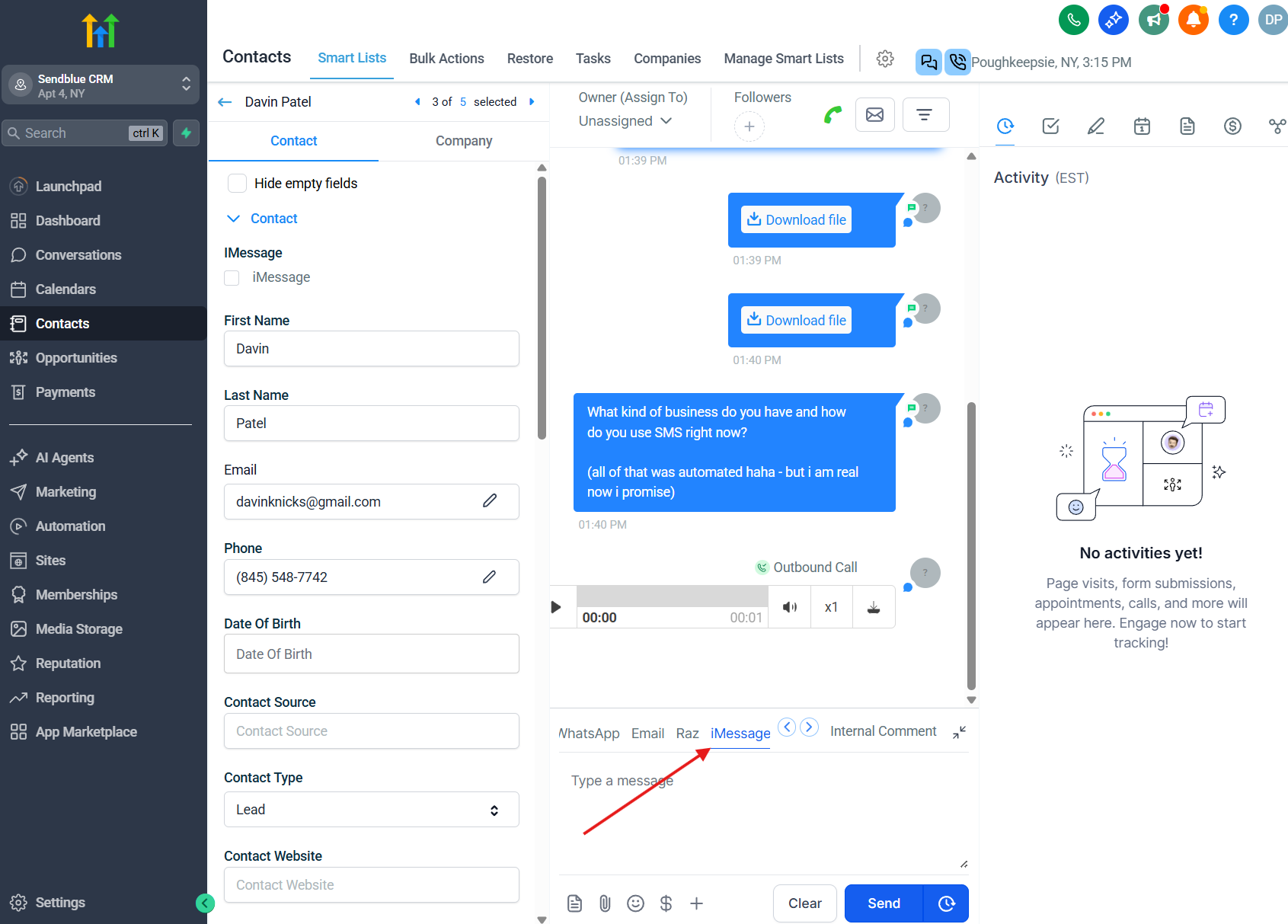
Once tagged, the iMessage tab becomes the active messaging option instead of SMS.
Screenshots provided show:
The workflow tag being applied.
The Conversations tab with the iMessage option highlighted.
Summary
The iMessage tag automatically routes that contact’s future communication through the iMessage channel in GHL instead of SMS, ensuring all messages send through the correct pathway and appear under the proper tab in Conversations.